
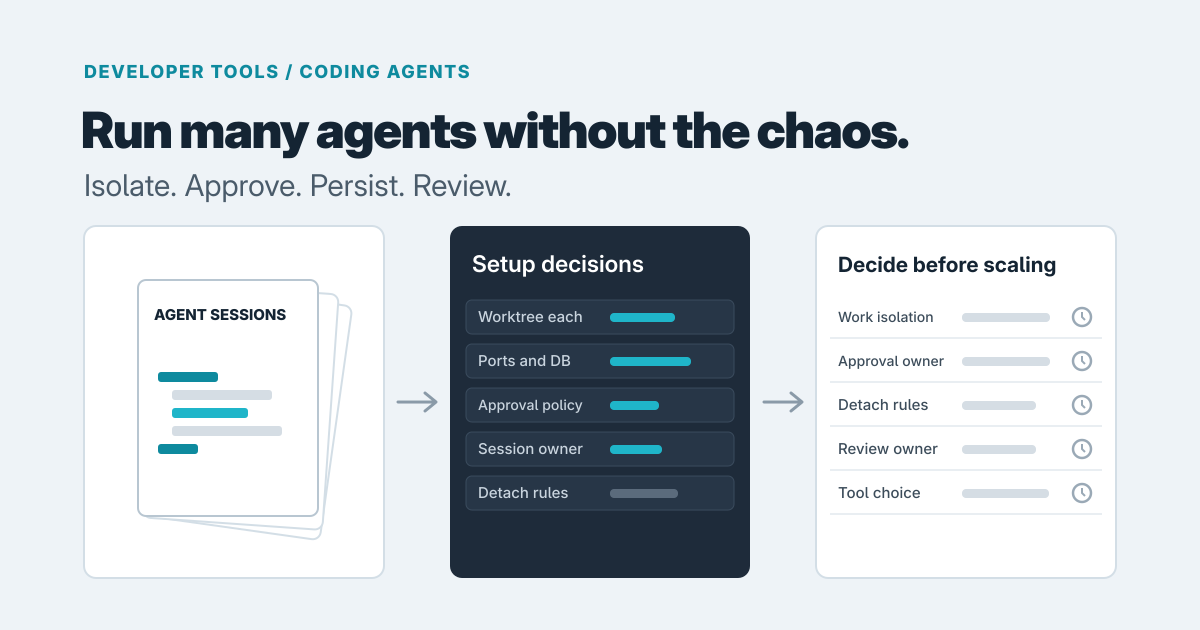
Running more coding agents at once is a coordination problem before it is a model problem. The models are rarely what slows a team down. What slows them down is a developer juggling several terminals, not knowing which agent is waiting for an answer, and discovering that two of them edited the same file. We'd plan for friction somewhere around three or four concurrent sessions, because that's roughly where one person's attention runs out. That's our expectation, not a measured threshold, but it's a good moment to put a few decisions in place.
What goes wrong first
Sessions get lost. An agent session lives inside a terminal process, so if that process ends and nothing else owns the agent, the agent stops. Claude Code can resume a named session, as its worktree documentation describes, but a resumed session isn't the same as an uninterrupted one. In our judgment, what you risk is the task that was running and the momentum behind it. For a ten-minute task that's an annoyance. For a long refactor it can cost an afternoon.
Agents also collide. Two agents in one checkout will eventually touch the same files. Git worktrees are the standard answer: each is a separate checkout on its own branch, and Claude Code's docs describe them as a way to run parallel sessions so changes don't collide. That holds for files. It isn't the whole story, because branches can still conflict at merge time, and ports, local databases and installed dependencies are often shared unless you handle them per worktree. We'd treat worktrees as necessary, not sufficient.
The third problem is quieter. An agent that has stopped to ask permission looks much like one that's still working until you check. With four sessions, a blocked agent can sit idle for an hour while its developer is busy with another. That idle time is the hidden cost of parallelism.
It's also an ownership problem, much like the one in why an automation keeps doing the same thing twice: when nobody clearly owns a long-running process, you get duplicated or abandoned work. Agent sessions need a named owner for the same reason scheduled jobs do.
Options, in order of effort
The cheapest start is the tools your developers already have: a terminal multiplexer such as tmux, one worktree per agent, and a naming convention. We haven't benchmarked this approach, so take this as general reasoning. It costs little, but the discipline lives in each person's habits. That works for one developer running a few sessions. It gets harder to sustain when a team wants the same conventions and a shared picture of what's running.
The next step is a multiplexer built for agents. These aim to give you one view of all sessions, show which need attention, and keep agents going when you detach. It's worth considering once several developers each run several agents and the "which one is waiting" problem is costing real time. You're adopting someone else's tool, so check how it treats the agents' own permission prompts and what happens if its background process stops.
The most expensive path is a custom orchestration layer, since someone has to build and own it. It makes sense when off-the-shelf tools can't meet a real requirement: your own work queue, audit trails, particular repository setup, or a link to your issue tracker. Before going there, check built-in features. Claude Code's docs present worktrees as one of several ways to run it in parallel and point to agent teams and a comparison page, so a built-in option may be enough.
Decisions to make before you pick a tool
Start with isolation. Give every agent its own worktree and branch, and decide what else must be separate: a port range, a test database, an environment file. Write it down once so nobody rediscovers it by breaking something.
Next, approvals. Who answers permission prompts, and how much do you pre-approve? That's a policy decision, not a convenience setting. Claude Code enforces its allow, ask and deny rules in the tool itself; a prompt or CLAUDE.md file shapes what the agent tries but doesn't change what it's allowed to do. Codex separates the sandbox (where it can write and whether it can reach the network) from the approval policy (when it must ask), as OpenAI describes. On the unattended end, Anthropic's permission modes course says bypassing prompts belongs only in containers and VMs, and OpenAI's Codex CLI reference says to avoid its bypass flag outside a dedicated sandbox VM. We'd keep those modes off developers' main machines. Also decide who may grant permanent approvals. Claude Code can save them for a repository, and worktrees of that repository may share them, so one developer's "don't ask again" can affect other sessions.
Then persistence. If a task needs to run for hours, something other than a laptop terminal should own it. If it doesn't, accept that a detached session may end and keep tasks small enough to restart.
Finally, review. Someone should own checking what each agent produced before it merges. Parallel agents multiply the review queue, and review is where the time you saved comes back to bill you.
A lesson from building Hive
When we built Hive, a terminal multiplexer for AI coding agents, two decisions shaped the design. A local daemon owns the processes: agents and their terminal state live in it, so a crashed or closed frontend never takes an agent's work with it. And we left the agents alone. Hive launches the Claude Code or Codex CLI developers already use, in a real terminal, with its own permission prompts intact, rather than wrapping or re-implementing it.
The limits matter. Hive is in early development and targets Linux first. Sessions survive closing or detaching the frontend, but not stopping the daemon or a reboot. Workspaces and Git worktree support are planned, not built. We offer it as a design question to ask of any tool you evaluate: what owns the process, and what happens when that thing dies?
Staying simple, and when to get help
If one or two developers run a few agents each, worktrees, a terminal multiplexer and a short written convention are enough. Revisit when review queues or idle blocked agents start costing noticeable time, and use a built-in feature if it does the job.
A purpose-built layer earns its keep when the setup has to be shared, audited or tied into your delivery process. That's where our developer tools work fits. If you can't tell whether a multiplexer is enough, a short software consulting engagement can settle it before you spend build time. Or get in touch with how many agents you run and where it hurts. We'd rather tell you a few conventions are enough than sell you a build.
Prepared with AI-assisted research and writing, with automated editorial checks before publication.