
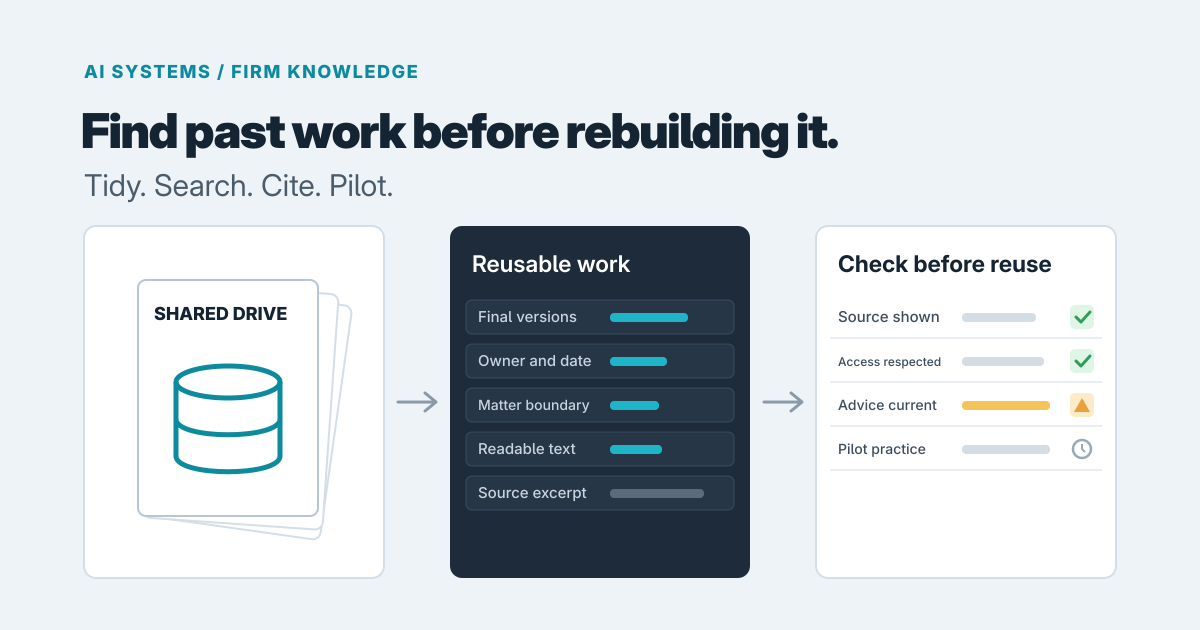
Yes, AI can help a firm find and reuse past work, but it's rarely the first thing to try, and it only works well on content that's already in decent shape. For most firms, the order should be: tidy up and use the search you already own, then pilot an AI retrieval tool on one practice area, and only then think about building something custom.
The reason is simple. An AI search tool doesn't create knowledge. It finds what's already there and, ideally, summarizes it. If the useful work is scattered across five versions of the same proposal, half of it unreadable scans, the tool will faithfully surface the mess.
Why the same work gets rebuilt
Firm knowledge lives in three places: shared drives organized by whoever set them up, email threads with the actual reasoning in them, and people's heads. Searching any of those costs more effort than starting a new document from a half-remembered template. So people rebuild. It's rational for each individual and expensive for the firm, because you pay senior time for research someone already did.
The fix isn't only a better search box. It's deciding what counts as reusable in the first place.
Try the cheap fixes first
We'd start here, and plenty of firms can stop here.
- Naming and folders. A consistent pattern (client or matter, document type, date, status such as final or draft) makes plain search far better. It costs a few hours of agreement and some discipline.
- Built-in search. SharePoint, OneDrive and Google Drive already search file names and contents. Check how well they work on your content before assuming they don't. One caveat: Google's documentation for the Drive connector in Gemini Enterprise says only 1 MB of text is extracted per file and that files over 10 MB for most types aren't searchable (Google Cloud docs). Long reports and large slide decks may only be partly findable, and that's worth testing on your own files.
- A curated library. A small folder of finished, approved examples, with an owner, often beats searching everything. Fifty good documents someone maintains are more useful than fifty thousand nobody trusts.
If people can find what they need after these steps, you don't need AI. If they still can't, because the question is "what have we said about X across all our work?" rather than "where's that file?", that's where retrieval earns its keep.
What an AI retrieval tool does differently
The common design is called retrieval-augmented generation, or RAG. Before answering, the model looks up relevant passages in your own documents rather than relying only on what it learned in training, and the answer can include citations to the sources (AWS explainer). That lets you ask a question in plain language and get an answer drawn from your past work.
Retrieval reduces made-up answers but doesn't eliminate them; the research survey on the approach describes it as a promising fix for hallucination and outdated knowledge, not a cure (Gao et al.). So the tool's value depends on how easily a person can check it.
That's why we'd insist on visible sources. A link to a 90-page document isn't much help. The tool should show the passage the answer relied on, with the document's title, date and owner. Research on attribution points to a specific risk: citations added after the answer is written can fail to match what the answer actually says (arXiv). Showing the excerpt lets a reviewer catch that in seconds.
When we built ResearchOS, a research and writing product, the lesson was to keep claims connected to their evidence: expose the trail so a claim can be examined in context, with a route back to the original source excerpt. The same principle applies here. ResearchOS isn't a firm knowledge tool and we're not claiming it is. But the habit transfers: an answer nobody can trace is an answer nobody should bill a client on.
Deciding what's safe to reuse
This is where firms get hurt, and it's mostly not a technology question.
Permissions. Microsoft's retrieval API trims results to what the calling user is already allowed to see (Microsoft Learn), and Google says NotebookLM stops using a file as a source when a user's access is revoked (Google Workspace Updates). That's reassuring, but it cuts both ways. A tool that respects permissions makes years of sloppy sharing easy to exploit, because content that was technically open but never found suddenly turns up in answers. Audit who can open what before connecting anything.
Matter boundaries. File permissions often don't match your real rules. Ethical walls, client confidentiality and "this team only" arrangements may live in people's heads or in a separate system. If the tool can't enforce them, keep that material out of the index.
Stale advice. Last year's guidance may be wrong today. Tag documents with a date and an owner, show both in results, and exclude superseded work. Drafts and unapproved material shouldn't be in the pool at all.
For firms with strict confidentiality duties, have your own counsel or compliance lead sign off on the rules. We can build to them, but we're not the ones to set them.
Scoping a small pilot
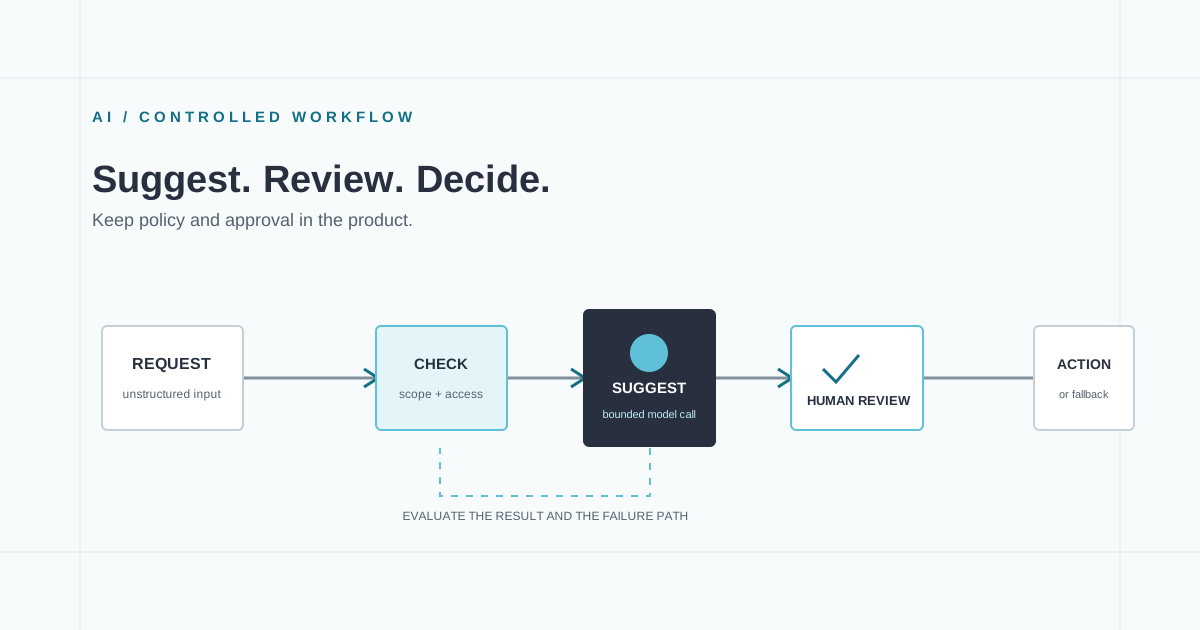
Pick one practice area, one content type (say, finished proposals or research memos) and a curated set. Define ten or so real questions staff ask, and what a good answer looks like. Then judge by whether people trust and use it, not by how impressive the demo is.
Signs your content isn't ready:
- No clear final versions, or duplicates everywhere
- No owner for most documents
- Broad "everyone" sharing on sensitive folders
- Scanned PDFs with no readable text
If several apply, spend the first month on cleanup. That's not wasted work; it improves your plain search too.
Buy or build
If your content sits in Microsoft 365 or Google Workspace and your needs are "find and summarize our documents," try the vendor's built-in tools first. Check current licensing and features, since both change often. Custom work makes sense when you need rules the platform can't express, such as matter-level boundaries, sources from several systems, or a review step before anything is reused. That's the kind of retrieval system our AI applications and agents work covers, and for an earlier decision on whether it's worth doing, software consulting is a smaller first step. Our piece on where AI fits in an internal workflow covers the review and fallback side.
If you're weighing a pilot, get in touch with the practice area and the questions your team keeps re-answering. We'll tell you honestly whether folders and search are enough.
Prepared with AI-assisted research and writing, with automated editorial checks before publication.