When a team says it wants to “add AI” to a workflow, the phrase can hide several different jobs: finding information, drafting a response, classifying a request, recommending an action, or carrying out a change. Those jobs have different risks and do not all need a model.
Start with the work, not the model. Write down the input, the decision or transformation, the expected result, and what happens if the result is wrong. Then decide which parts need flexible interpretation and which parts need exact, repeatable rules.
Use ordinary software for exact rules
If a task has clear inputs and a stable rule, ordinary application code is usually easier to test and explain. Calculating a due date, checking whether a field is present, or applying a known permission rule should not depend on a model guessing the answer.
A model can still help around that logic. It might turn an unstructured request into proposed fields, summarize a long note, or retrieve relevant passages. The application can then validate the output and keep the final rule-based decision in code.
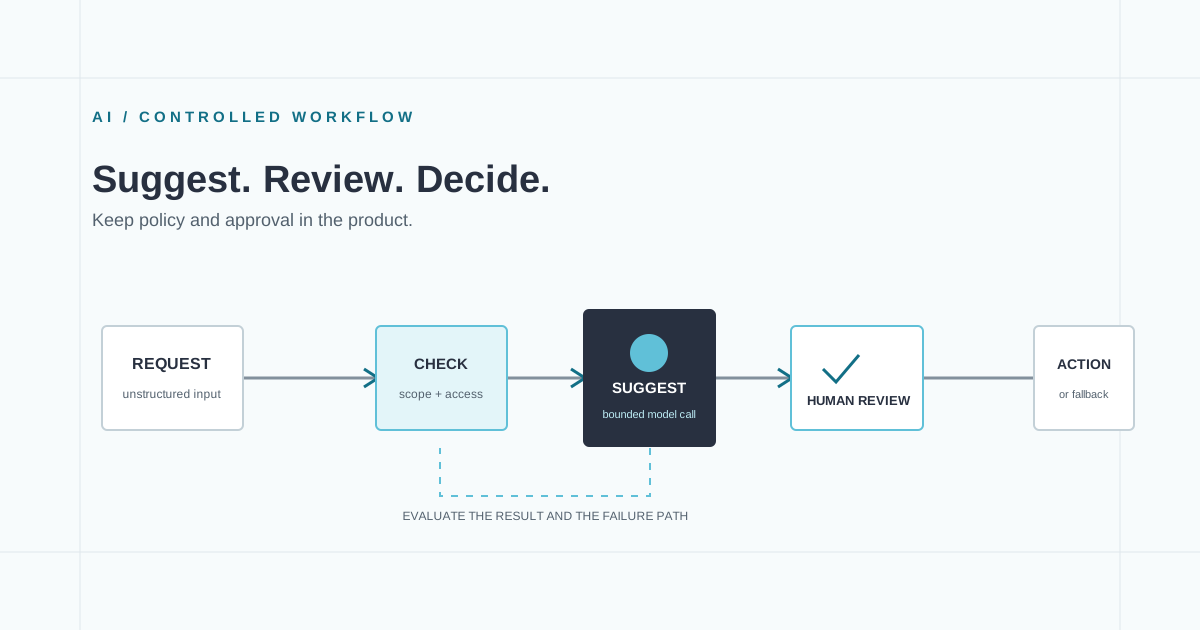
One useful boundary is: let the model interpret language; let the application enforce policy. Treat the model response as data that may be incomplete or malformed, not as a trusted instruction to the rest of the system.
Look for the right kind of uncertainty
Model assistance is more promising when inputs vary in wording but the person’s goal stays similar. Examples include sorting free-text requests into a small set of queues, finding relevant material across documents, or drafting a response from approved source material. These are still hypotheses to test against the actual workflow.
Ask whether a wrong answer is easy to spot and reverse. A suggested category is often reviewable. A payment, account change, or message sent to a customer may need explicit approval and a clear record of what was proposed. If a mistake can create harm or become hard to undo, reduce the model’s authority and strengthen the review path.
Design the review path before the prompt
Decide which results can be accepted automatically, which need a person, and which should stop for more information. Show the evidence or source material that informed the suggestion. Make it easy to correct an answer, and preserve the corrected result where it can improve the evaluation set.
Also plan the ordinary failure cases: no relevant information, conflicting sources, a request outside the intended scope, provider timeout, or output that fails validation. A useful product has a safe fallback for each of these. “Try again” is not always a sufficient fallback; sometimes the right response is to return the work to the existing manual path.
Evaluate the job, not how convincing the answer sounds
Build a small set of real or carefully anonymized examples before launch. Include routine inputs, ambiguous ones, edge cases, and cases where the model should decline to answer. For each, write down what an acceptable result means and which errors matter most.
Review those examples whenever the prompt, model, retrieval sources, or workflow changes. Track both quality and operational behavior: whether the result meets the task criteria, how often a person needs to correct it, whether the source material was appropriate, and what happens during failures. The OpenAI Evals guide describes evaluations as a way to measure model performance against defined criteria; the NIST Generative AI Profile is a broader resource for identifying and managing risks across a generative AI system’s lifecycle.
Check data and ownership
Before connecting a model to internal work, identify what information may leave your system, which provider receives it, how access is controlled, and what records need to be retained. These are product and operational decisions, not details to defer until after the demo.
Give the feature a named owner and a way to turn it off or route work back to the existing process. If your team has a specific task in mind, we can help test whether an AI workflow is a sensible fit.