
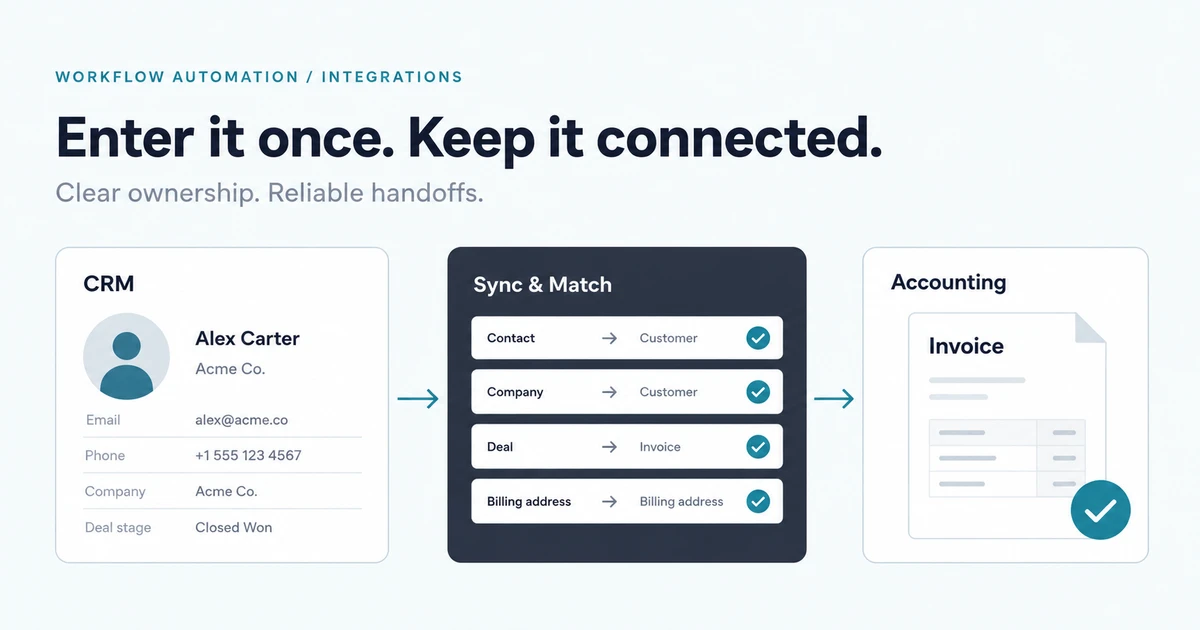
A sale closes in the CRM. Someone copies the customer's details into accounting, retypes the approved line items, and sends a message asking whether the invoice is ready. Later, someone else updates a spreadsheet so sales can see what happened.
If that describes your handoff, CRM and accounting integration is worth investigating. The aim is to remove repeated entry while keeping sales and finance clear about which records they own. Connecting the systems is only useful if the team can trust the result and repair a failed transfer.
Start with one sales-to-finance handoff
Avoid starting with “sync everything.” Choose a specific business event and the record it should produce. For example, an approved order could prepare a draft invoice for finance to review. A deal marked as won might be too early if pricing or billing details still need approval.
For this illustrative first scope, define:
- The event that makes the order ready for accounting.
- The customer identifier shared between systems.
- The approved fields and line items to transfer.
- The person who reviews the draft.
- The status sales needs to see after the handoff.
Keep issuing the invoice separate from preparing it unless the business explicitly wants both automated. An integration should follow the actual approval process rather than infer it from a convenient CRM status.
Choose which system owns each field
A CRM may own relationship notes and sales contacts. Accounting may own invoice numbers and payment status. Billing details need an agreed owner too: decide where a correction should be made and whether it should update the other system.
Write this down field by field. Two-way synchronization can create a loop when each system interprets the other's update as a new change. It also leaves a difficult question when two people edit the same information: whose change wins?
Match customers using a maintained identifier mapping where possible. Names and email addresses can change or be shared across records. If a match is uncertain, route it to a person rather than creating another customer automatically. Resolving existing duplicates may be a necessary first step before the new integration starts.
When is a native connector enough?
Check your existing products' integrations first. A native connector or configurable automation platform may handle the workflow if it supports your trigger, required fields, account structure, and approval boundary.
Test more than the successful transfer. Can the connector explain a rejected record? Can staff retry it safely? Does it handle a corrected order, a canceled deal, or an expired connection? Is the required behavior available on your current product plans?
Custom API integration becomes a stronger candidate when a standard connector misses important rules: several entities must move together, customer matching is unusual, or a review queue is needed before finance accepts the data. A custom service also needs an owner, monitoring, and maintenance. Include those responsibilities when comparing options.
Make retries safe and failures visible
An interrupted request creates a practical problem: accounting may have created the draft even though the integration did not receive the response. Blindly repeating the request could create a second draft.
Design a way to recognize the same business operation across attempts. Use a destination's supported deduplication mechanism where available, or check the recorded relationship and destination state before trying again. Persist enough progress to distinguish queued work, a completed write, and a record requiring investigation.
Webhook behavior also belongs in the plan. A webhook tells your integration about a change in another system. The QuickBooks Online webhook documentation describes event-triggered callbacks; the implementation still needs to follow the destination's delivery contract and recovery guidance.
Give operators a small queue showing failures, a safe explanation, and the next available action. If a token expires or a required field is missing, the team should be able to tell which orders were affected. “The automation ran” is less useful than “these records reached accounting, and these need attention.”
Scope and cost depend on the difficult cases
Before requesting an integration estimate, list the software and product plans, approximate record volume, required fields, and any existing connectors. Confirm that the relevant APIs support the operations you need. Restricted API access can change the available approach.
The main scope drivers often include historical cleanup, line-item transformations, multiple business accounts, corrections after transfer, and the level of operational support required. A one-way draft-creation workflow has a different scope from two-way synchronization across the entire customer lifecycle.
Agree on access permissions and credential ownership. Decide who can pause the integration, repair a mapping, and authorize a retry. These choices make the tool maintainable after its original developer finishes the build.
Verify the handoff before expanding it
Pilot with a bounded set of records. Compare the source order to the resulting draft and confirm that finance can complete its review. Include a duplicate event, a missing customer match, an interrupted transfer, and a correction after the first attempt.
Measure manual touches, reconciliation effort, and time from an approved order to a ready draft. Expand only when the team can account for what happened to each record. If other parts of the process still depend on an older system, a gradual modernization approach can keep the first change manageable.
If your staff keep retyping the same information, our workflow automation service can help map the handoff and connect the systems around it. Tell Jared and Esraa which CRM and accounting tools you use, what triggers the transfer, and where people currently have to intervene. That is enough to start a useful discussion about a focused integration.