If your team opens a PDF, finds a few details, and types them into another system every day, you have a concrete candidate for automation. The opportunity is not simply to make a model read the document. It is to get usable information into the right workflow without creating a new cleanup job.
AI document processing for small businesses works best when the first scope is narrow: one recurring document type, a defined set of fields, and someone responsible for checking exceptions. That might mean extracting purchase-order details into a draft record or turning an onboarding form into a reviewable intake task.
Which document workflow should you automate first?
Choose a process with repeated manual entry and a clear destination. Start with the documents your team already handles, rather than a demonstration built around unusually tidy samples.
For an illustrative supplier-intake workflow, staff might receive order PDFs, identify the supplier, copy item codes and quantities, and check the delivery address. A first release could prepare those fields for review. Approving the order would remain a separate action.
Before choosing a tool, answer five questions:
- Which document type accounts for a meaningful share of the work?
- Which fields does the next person actually need?
- Where should the reviewed information go?
- Which mistakes would cause expensive downstream corrections?
- Who handles an unreadable file, a missing field, or an unfamiliar layout?
If those answers are unclear, map the current workflow first. Automating an ambiguous handoff can make its ambiguity harder to see.
PDF data extraction is one step in the system
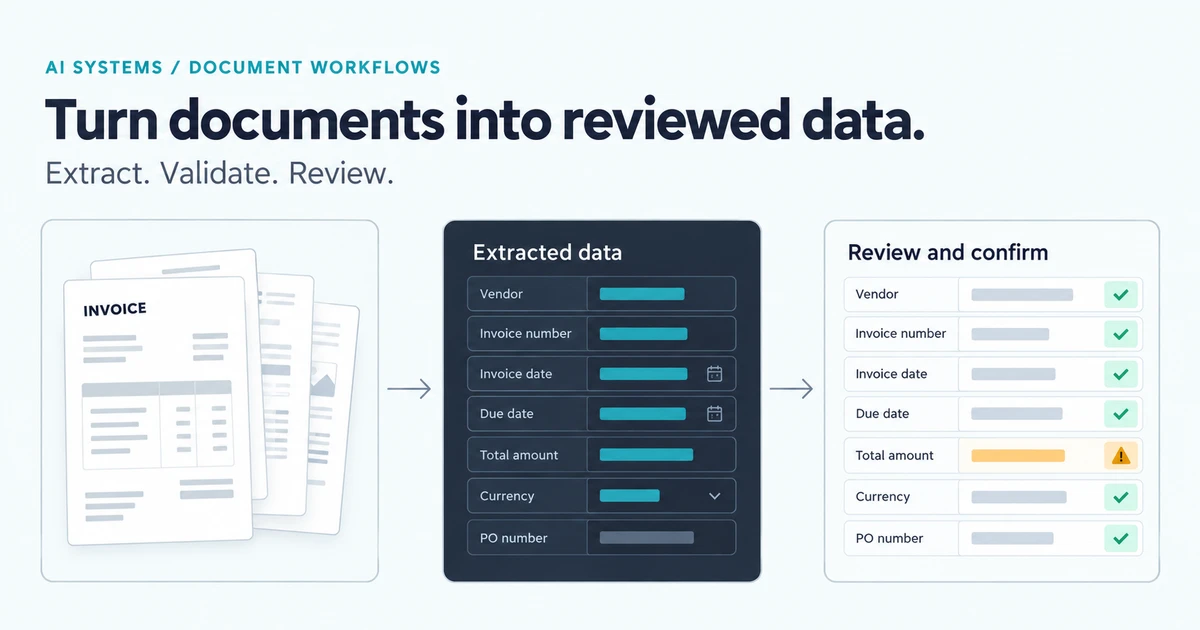
Think of the workflow as intake, extraction, validation, review, and delivery. Each stage needs a visible result.
Intake records where the file came from and whether it has already been processed. Extraction proposes values. Validation checks requirements such as a recognized item code, a plausible date, or a required address. Review gives a person the original evidence and the proposed record together. Delivery writes the approved result to its destination and records whether that write succeeded.
A valid-looking value can still be wrong. A date may have the right format but belong to the wrong section of the document. A supplier name may resemble another supplier. Keep the source page or passage available so a reviewer can resolve these differences without searching the whole file again.
Design human review before promising unattended processing
Confidence scores can help prioritize review, but choose thresholds using your own documents and the consequences of a mistake. Microsoft's Document Intelligence transparency guidance describes using confidence values to route results for review and testing performance on the intended inputs.
During a pilot, have a person check every proposed record. Record corrections by field and document type. Then decide which cases, if any, have enough evidence to proceed with less review. A model writing “high confidence” in a response is not a substitute for that evaluation.
The review screen should distinguish a missing value, conflicting evidence, and a failed extraction. Let the reviewer correct a field, request a better file, or reject the document. A single approval button is not enough when the underlying record is incomplete.
Should you buy document-processing software or build a custom workflow?
An existing product may be sufficient if it handles your layouts, lets staff review results, and connects to the destination system. A configurable extraction service can also supply one component while a small application manages the surrounding workflow.
Custom development becomes worth considering when the work involves distinctive validation rules, several document types tied to one case, or a review process that existing products cannot express. Ask a prospective development partner to demonstrate your awkward examples as well as the easy ones.
Compare the full operating cost: document volume, page counts, model calls, storage, integration work, review time, and ongoing support. There is no useful universal project price without knowing those boundaries. More document types, destinations, and exception paths each add work to the scope.
Measure the completed task
Before the pilot, measure the time spent entering and correcting records today. Afterward, include review and exception handling in the comparison. Fast extraction is not a business improvement if staff spend longer fixing the output.
Track field corrections, records needing review, failed deliveries, and the time from receipt to a usable record. Keep a separate set of representative documents for evaluation so the team does not judge quality only on examples used during development. Include poor scans, changed layouts, and documents with missing information.
Agree who can access the files, where they are processed, how long they are retained, and which details belong in logs. Treat those decisions as part of the application scope.
Prepare a brief for AI document-processing development
A useful first brief names the document type, approximate monthly volume, required fields, destination software, current review process, and the errors your team most needs to avoid. Describe the layouts and exceptions; sensitive files can wait until there is an agreed way to share them.
At Codefront Labs, our AI development work connects model outputs to explicit validation, review, and recovery paths. If document entry is slowing your team down, tell Esraa and Jared about one document workflow. We can help assess whether an existing tool fits or a focused custom application would better support the work.