
A spreadsheet can be an excellent way to understand a business process. The problem starts when the workbook becomes the process itself: people copy rows between tabs, protect formulas from accidental edits, and ask a colleague which version contains the latest changes.
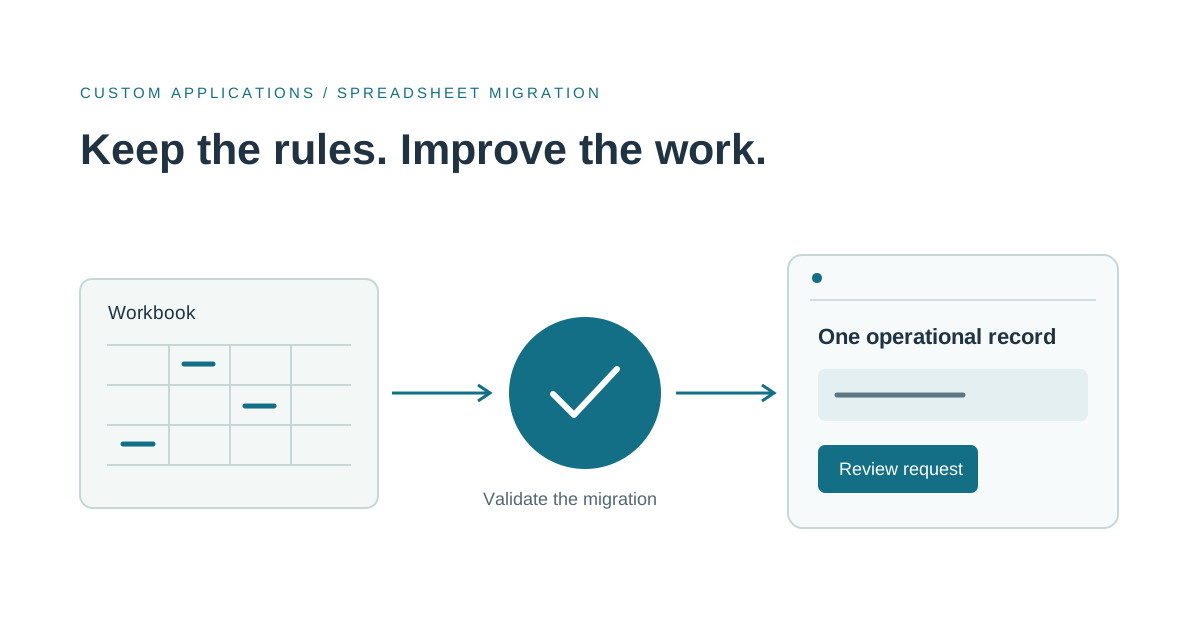
If you are looking to replace Excel with a custom web application, start by identifying the shared operational work inside the file. The goal is to preserve useful rules and make updates dependable. Moving every cell into a browser would reproduce the workbook's complexity without necessarily solving the coordination problem.
When should you replace an Excel business tracker?
A workbook may still be the right tool for an analyst exploring a question, a small team maintaining a straightforward list, or occasional planning. Better table design, validation, and a documented process might be enough.
Consider an application when the tracker coordinates recurring work across several people and requires controls that are difficult to maintain in the current setup. Warning signs include manual row copying, inconsistent identifiers, hidden rules in formulas or macros, and updates that need approval before they become authoritative.
For an illustrative equipment-request tracker, staff might enter requests, check available items, reserve stock, and record collection. A spreadsheet replacement should clarify those records and transitions. It does not necessarily need a general-purpose spreadsheet editor or an elaborate reporting suite.
Decide whether a configurable platform is enough
Before commissioning custom software, assess existing workflow products and low-code options against your actual process. Microsoft documents that canvas apps can connect to Excel workbooks, lists, SQL tables, and other data sources. A configured platform may be sufficient when its data model and supported connections fit the work.
Compare options using an awkward real example: an amended request, a missing identifier, or two people trying to change the same record. Ask how each option handles validation, access, exports, and recovery. Review the current platform's limitations for the data source you would actually use; a demonstration with a few records is not a capacity assessment.
Custom Excel-to-web-application development becomes worth evaluating when the process needs distinctive calculations, several related record types, external integrations, or a specific user experience that configuration cannot reasonably support. Include ongoing operating costs and ownership in the decision.
Convert rows into records before designing screens
A row may combine several things that should become separate records. A customer, a request, and individual requested items have different lifecycles. Giving them explicit identifiers makes it possible to update one without accidentally changing another.
List the entities, their relationships, and the fields each requires. Identify which columns contain source data, calculated results, temporary notes, or copied values from another tool. Decide which system owns each value.
Clean up duplicates using a documented rule. Two rows with the same company name are not automatically the same customer. Keep an import report showing accepted records, rejected rows, and unresolved matches so the business can review the outcome. Avoid silently discarding data to make an import appear successful.
Treat formulas as business rules that need examples
Inventory formulas, named ranges, macros, lookup tables, and manual overrides. Ask the person operating the workbook which calculations are authoritative and which are convenient estimates. Some important rules may exist only as an instruction to change a particular cell.
For every calculation moving into the application, collect inputs and expected results. Include blank values, boundary dates, rounding, cancelled records, and overrides. Agree how an override is recorded and who may make one. Automated checks should compare the application's output with these approved examples.
Keep analytical exports available where useful. The operational application can own the records while Excel remains a tool for exploration. Decide whether exports are snapshots or editable imports; users should not assume that changing an exported file updates the application.
Scope the first custom web application around one completed task
Start with a workflow that includes entry, validation, a decision, and a visible result. For the equipment-request example, that could mean submitting a request, reviewing availability, confirming a reservation, and recording collection. Handle cancellation and unavailable stock in the same scope rather than leaving them as undocumented manual corrections.
Include named users, the required record access, a history of important changes, and a reviewed import from the workbook. Build an export path so the business can retrieve its records. Specify what happens when two staff members edit the same request; silently overwriting the earlier update is not an acceptable default for consequential work.
Separate a necessary integration from a convenient later feature. A request application may need a live stock check to complete its task, while an optional accounting export can wait. This distinction helps a development partner propose a coherent release rather than quote an unbounded list of screens.
Plan the cutover before staff start using the application
Rehearse the import with a copy of the workbook. Compare record counts, totals that matter to the business, and a sample of individual histories. Investigate differences instead of accepting a green import message as proof of correctness.
Choose a cutover time and define which system accepts new changes afterward. A short comparison period can help validate calculations, but parallel editing without clear ownership creates competing versions again. Preserve the original workbook as an appropriate read-only reference, and agree how corrections discovered after migration will be handled.
Define rollback carefully. Returning to Excel after the application has accepted new records requires a way to preserve those changes. Document the trigger, the export or reconciliation procedure, and the person who can make the decision.
What to send a spreadsheet replacement development partner
A useful brief explains who edits the workbook, how often it changes, its approximate record count, the task it coordinates, and the formulas or macros the business relies on. Describe connected systems, access needs, imports, and the desired operating owner. Start with a sanitized workbook or a structural description rather than emailing confidential data.
Codefront Labs builds custom software for work that existing tools cannot comfortably support. If a shared spreadsheet is coordinating an important business process, tell Esraa and Jared what the workbook does. We can help compare configuration with custom development and scope a migration that preserves the rules your team depends on.