A client asks whether the latest document is ready. Someone searches an email thread, checks with the delivery team, and sends an update. Later, another colleague repeats the same search to find out whether the client approved it. When this becomes routine, the issue is worth investigating before buying another communication tool.
Custom client portal development for professional services can give clients one place to see what needs their attention and give staff a reliable record of the response. The first release should support a specific exchange: submit information, review a deliverable, or approve a defined version. A branded login page alone will not reduce the work behind the scenes.
When does a service business need a custom client portal?
Look for repeated coordination costs rather than a vague desire to appear more established. Are staff answering the same status questions? Do clients send files to several inboxes? Does the team struggle to identify which version received approval? Those are useful starting points because you can observe the current process and compare it with a pilot.
An illustrative consulting engagement might need three client actions: provide an intake document, review a draft, and approve the revised deliverable. That is a much clearer first scope than a portal containing every aspect of the business. Keep invoicing, scheduling, and internal project management in their existing tools unless they are necessary to complete this exchange.
Define the client group too. A customer managing one engagement may need a different experience from an account manager coordinating several projects. Interview people who will actually use the portal, including clients who prefer email, before choosing the default flow.
Build around the client's next action
The opening screen should answer three questions: what is happening, what do I need to do, and what happens after I do it? An internal status such as “stage four” usually needs a clearer client-facing explanation.
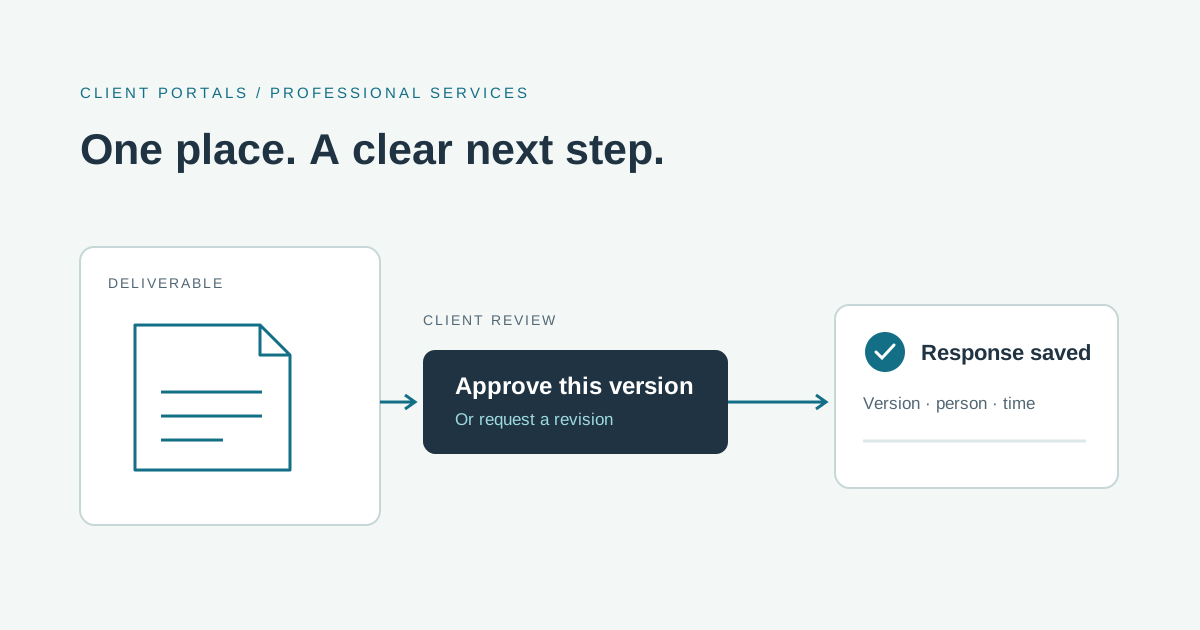
For a deliverable awaiting review, show its name, current version, review instructions, and the requested response. Explain whether the client can approve, request changes, or ask a question. After submission, show a receipt and the next step. A client should not have to email staff to confirm that the portal saved their response.
Notifications should lead directly to the relevant engagement or document after sign-in. Decide which events merit an email, who receives it, and what happens if delivery fails. Keep sensitive document contents out of notification previews when that is appropriate for the work.
Document sharing and approvals need a clear record
An approval belongs to a particular deliverable version. If staff replace that file later, the application should preserve which version was reviewed rather than making the old approval appear to apply to the replacement.
Record the approving account, the version, the response, and the time. Define whether a requested revision reopens the review and whether more than one client contact must respond. These are product decisions to settle with the business. Do not describe a basic approval button as a legally binding electronic signature without separately establishing the applicable requirements.
Uploads also need deliberate handling. Restrict supported file types and sizes, validate the uploaded content, and keep private documents behind access checks. OWASP's file-upload guidance explains why filenames and browser-provided content types should not be trusted on their own.
Should you buy a client portal or commission one?
An existing client portal may be the better choice when its engagement model, document workflow, and access controls fit your process. Ask vendors to demonstrate one real exchange, including a revised file and a client requesting changes. Compare the effort required from both clients and staff.
Custom development becomes a reasonable option when distinctive approval rules, existing systems, or account structures require workarounds in available products. For example, the client view may need to reflect a delivery record already owned by your internal application. Creating a second independent status record would add another reconciliation job.
For a configurable tool, include setup, licenses, integrations, exports, and ongoing administration in the comparison. For custom software, include development, hosting, maintenance, support, and the person responsible for operating it. We cannot give a useful universal price without knowing those boundaries.
What should the first development scope include?
A focused release could include invited client accounts, an engagement view, one document exchange, one approval flow, and an internal queue showing outstanding responses. Agree who can invite a colleague, remove access, and handle a client who cannot sign in.
Test isolation between client accounts, not just whether login works. A user must not gain another client's document by changing a URL. Access checks belong on the server for every relevant request; OWASP's authorization guidance recommends validating permissions on every request.
During the pilot, measure status inquiries, missing submissions, time spent locating approvals, and staff effort per exchange. Include client feedback and support requests. A reduction in internal email means little if clients now need help completing every step.
Prepare a client portal development brief
Tell a development partner which service you deliver, which client exchange causes repeated work, which systems own the records, and what an approval means. Include approximate account counts, document types, invitation rules, and the team responsible for follow-up. Share anonymized examples first; agree on a secure process before sending private client files.
Codefront Labs designs and builds custom applications around these operational details. If your team is repeatedly chasing documents or searching for client sign-off, tell Esraa and Jared about one engagement workflow. We can help assess whether an existing portal fits and define a first scope when custom development is justified.