
A growing SaaS product eventually receives a request that sounds small: let a customer invite a contractor, give finance access to exports, or allow a manager to approve changes without editing the original record. If the application only understands “user” and “admin,” that request can expose a much larger design gap.
Permissions define how customers share work inside your product. Planning them early gives the team a clearer basis for pricing, invitations, support, and collaboration features. It also reduces the temptation to grant broad access just to accommodate one urgent request.
Describe actions before naming roles
Start with a list of meaningful operations. Viewing a project, changing its settings, inviting a member, downloading an export, and deleting a record are separate actions. They should not automatically come as a package.
Then describe the scope of each action. A person might edit projects assigned to them, view all projects in their organization, or administer only the team's membership. A role name is a convenient label for some of these permissions; it is not a complete description of the policy.
Use an illustrative permission matrix during planning. For each action, record who may perform it, on which records, under what conditions, and what happens when access is removed. Keep the matrix readable enough that a product owner can review it alongside an engineer.
Treat account boundaries as a separate requirement
In a product serving multiple customer organizations, an administrator for one organization should not inherit authority over another. A record identifier supplied by a browser is a request to access that record, not proof of permission.
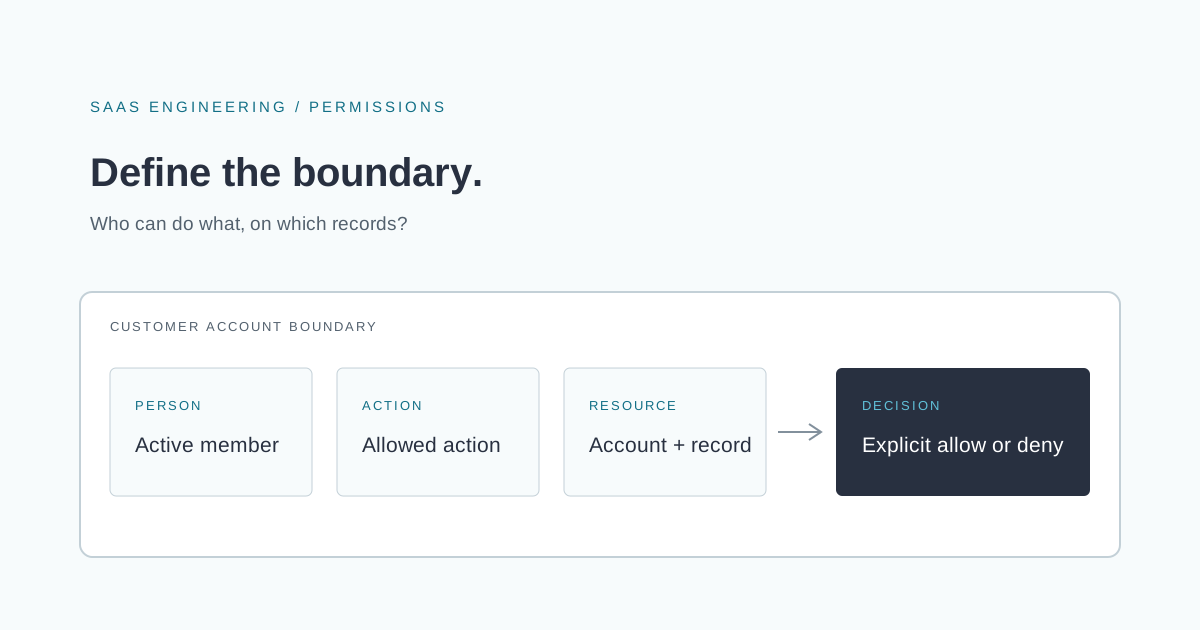
When designing an endpoint, make the authorization question explicit: is this person currently allowed to perform this action on this particular resource? Account membership and record relationships belong in that decision. A role checked without the resource's context leaves an important question unanswered.
The OWASP Authorization Cheat Sheet recommends least privilege, denying access by default, and validating authorization on every request, including access to specific objects. Hiding a control in the interface does not enforce those rules on the server.
Include files, exports, and background work
Access control applies to more than the main application screens. Consider downloadable attachments, report exports, search results, notifications, and jobs that run after a user clicks a button.
For a hypothetical export feature, decide who may request the export, what data it includes, who may retrieve the finished file, and how long that access should last. If the user's access changes while the job is running, define whether the job should finish and whether its result may still be downloaded.
The same policy should guide these paths. A restricted record should not become visible through a search snippet or an emailed attachment merely because those features were implemented separately.
Design invitations and revocation together
An invitation needs a destination account, an intended permission set, an expiry rule, and a clear acceptance process. Do not allow a stale invitation to grant permissions that its sender can no longer authorize.
Revocation deserves equal attention. Decide how the system handles a removed member, an expired contractor relationship, or an ownership transfer. Review cached permissions and long-lived sessions against the required revocation behavior; there is no universal interval that fits every product.
Be explicit about support access as well. If staff need exceptional access to investigate a customer issue, define who can grant it, its duration, and what record of that access is retained. Avoid an undocumented permanent shortcut.
Test the access you intend to deny
Successful actions are only part of the test plan. Include cases where the resource belongs to a different account, membership was removed, a user requests a stronger action than their role permits, or an invitation has expired.
Repeat those checks for direct API calls and file retrieval, not just navigation through the interface. Test failures of the permission lookup itself so an unavailable policy store does not quietly become an approval. These tests support the design; they do not replace a broader security review.
Make permissions part of the product contract
Clear access rules help a customer understand what they are buying and how they can safely involve colleagues. Document the capabilities of each role in ordinary language, and explain consequential changes before someone confirms them.
If enterprise conversations are uncovering permissions your product cannot express, we can help review the SaaS architecture and design the access model. A useful first discussion starts with the collaboration scenarios customers are requesting and the rules the current system actually enforces.