
Few support tickets are more awkward for a SaaS team than this one: a customer upgraded, the card went through, the receipt arrived and the billing dashboard shows an active subscription, but the new features are still locked in the app. The money arrived, and the product didn't notice.
One place we'd check first is the connection between billing and product access. Your app may be making decisions from its own copy of the subscription record. How does that copy stay up to date?
Two systems, two opinions
Billing software answers one question well: what has this customer agreed to pay for, and has the payment worked? Your product has to answer a different one: what should this account be allowed to use right now?
Those sound like the same question, but they aren't. Stripe's subscription documentation describes the states a subscription moves through as it is created, renewed and cancelled. Your product still needs a policy for what those states mean for access. A subscription that's past due after a failed card isn't automatically a locked account. Maybe you give people a week. Maybe annual customers get longer. Maybe a trial, a manual discount for a friendly customer, or a one-off exception sits on top of all of it.
So the useful move is to treat access as its own thing, owned by your product, and derived from billing plus your rules. Once you do, a lot of confusing support tickets stop being mysteries. Either the derivation ran with stale information, or the rule was never written down.
Why the copy drifts
One way to keep that local copy up to date is with webhooks, which are automatic notifications the billing provider sends when something changes. It works nicely until it doesn't, and the ways it fails are mundane. Stripe's webhook documentation says events aren't guaranteed to arrive in the order they were created, and that the same event can be delivered more than once.
That has a practical consequence. If your system simply writes whatever the latest message says, an older message arriving late can overwrite newer, correct information. The customer upgraded, then an earlier "still on the free plan" notice showed up afterward and won. A sturdier approach treats each notification as a nudge to go ask the provider what's true now, rather than as the truth itself.
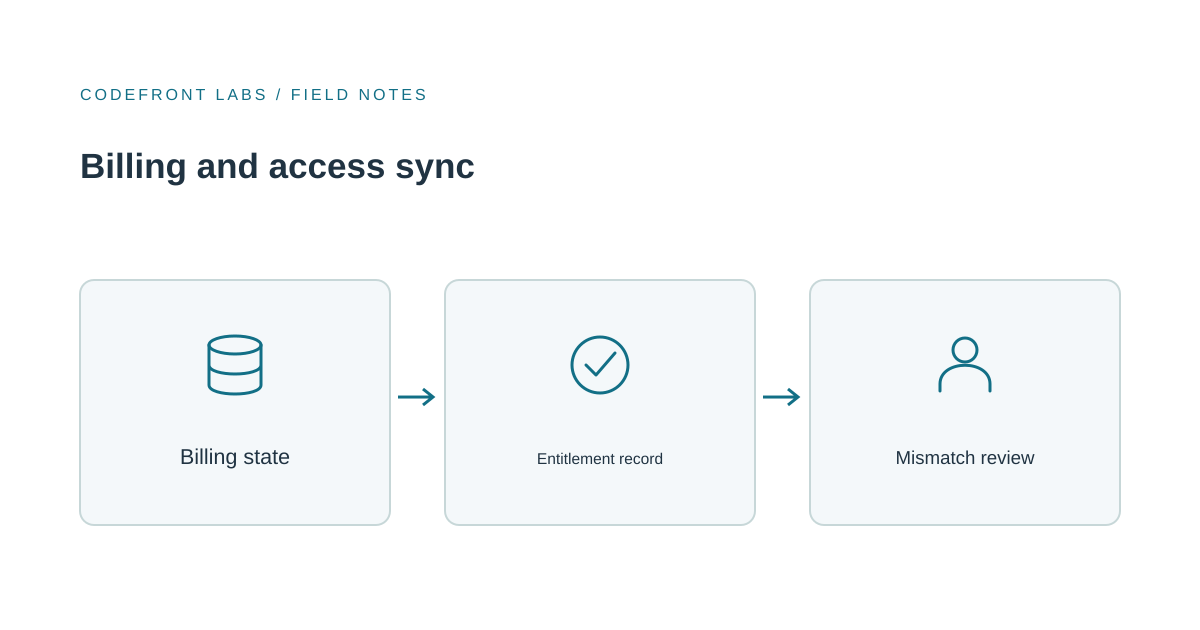
Even then, a notification can be missed entirely, or your own code can fail on it. That's why drift needs a second safety net: a periodic check that compares billing state with product state and flags the differences.
Be careful with automatic fixes
The tempting design is a nightly job that corrects every mismatch it finds. For some cases that's fine. If a confirmed payment maps to the right account and the purchased plan clearly includes the feature, restoring that feature can be a reasonable automatic correction.
Revoking is where I'd slow down. If the job concludes a customer shouldn't have access because of a failed lookup or a temporary provider error, you've created exactly the support ticket you were trying to prevent, only worse, because now a paying customer is locked out by your own cleanup. We'd automate corrections only when the account, plan and access rule are confirmed, and send ambiguous cases, such as a past-due account or a disputed payment, to a person. Whoever reviews it should be applying a grace policy you've actually chosen, not guessing.
It also helps to log every change with what it was before, what it became, and why. When a customer asks what happened, you want an answer in a minute, not an afternoon of digging.
When the provider's features are enough
You don't always need to build anything. If each customer has one plan, plans map cleanly to a fixed set of features, and a short delay between payment and access is acceptable, the provider's built-in tools plus a well-behaved notification handler may be all you need. Fix the one transition that's misbehaving and move on.
A dedicated access layer in your own product starts to earn its keep when the rules outgrow billing. That might be usage limits, seats, add-ons, manual exceptions, or access that has to keep working when the provider can't be reached. It also helps when support needs one clear explanation for why an account has or lacks a feature. It costs real effort to build and maintain, so I'd only choose it when the simple route is visibly straining.
A good first step is cheap: compare billing and product state read-only for a couple of weeks and see where the mismatches cluster. A cluster around one transition gives you a focused place to investigate. Mismatches scattered across many situations suggest the access rules need a proper design before you add more patches.
If you're seeing paid customers locked out, or access lingering after cancellations, we're happy to talk it through. Our SaaS development work includes this kind of product architecture, and you can describe your billing setup to start a conversation. If the problem touches who can do what inside an account, our piece on SaaS permissions and access control covers that related but separate question.
Prepared with AI-assisted research and writing, with automated editorial checks before publication.